i215 LiDAR Robot Vacuum for Gamers: Smart Mapping and ‘Garage’ Auto-Dock to Keep Battle Stations Dust-Free
Disclosure: This post contains affiliate links. If you make a purchase through these links, we may earn a small commission at no extra cost to you.
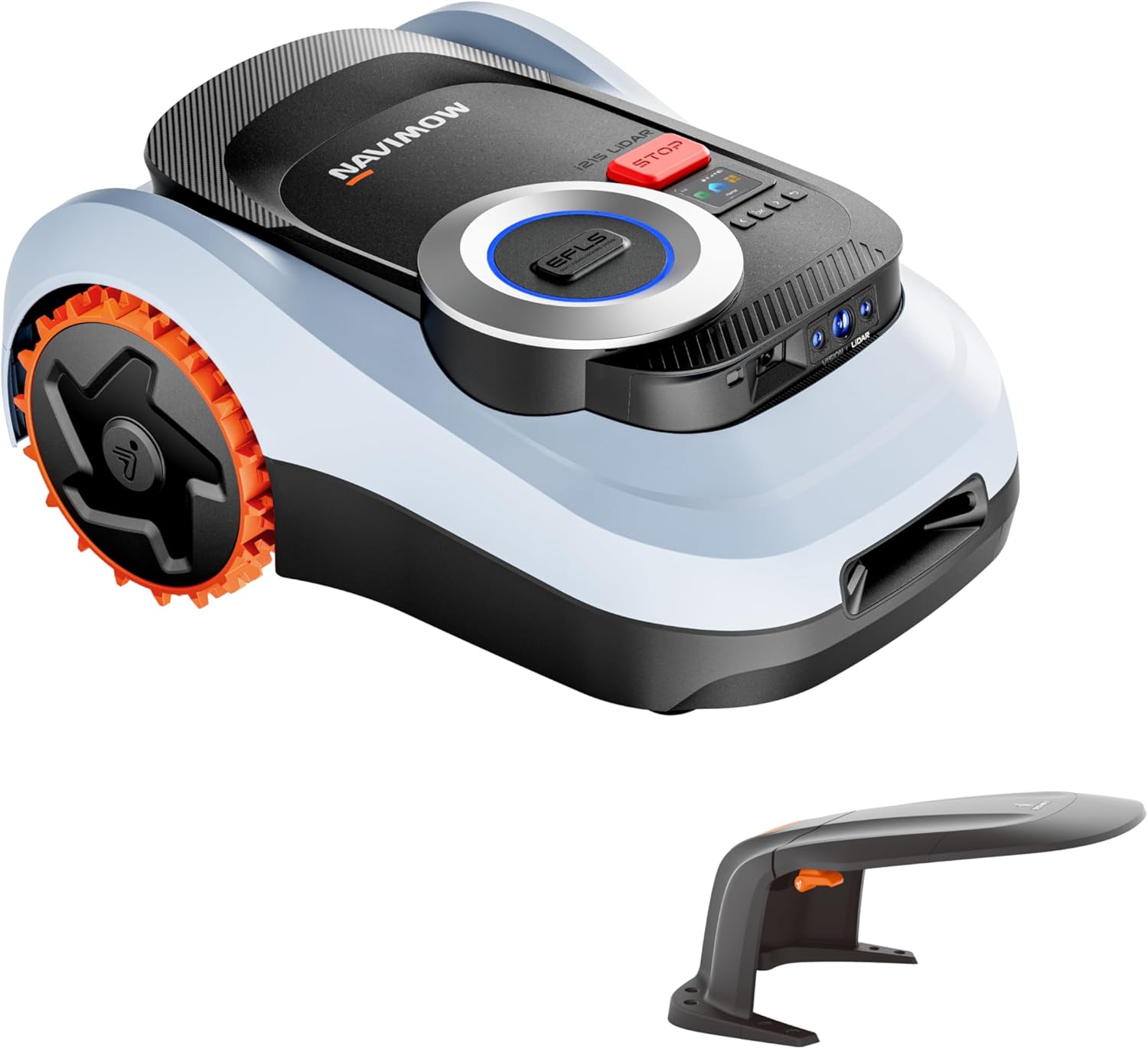
Click image to check the latest price
My gaming corner used to be a no-go zone for any vacuum. RGB strips snake along the baseboard, a surge protector anchors a nest of USB and DisplayPort cables, and a chunky chair mat guards the floor like a plastic moat. After a long night of raids and takeout, I would stare at the crumbs under my keyboard tray and the dust bunnies that drifted under the desk, promise myself I would grab a broom, and then promptly queue for another match. I wanted hands-off cleanup, but I refused to risk a hungry robot chewing through my lifeline cables.
That changed after I borrowed a friend’s robot vacuum for a weekend and watched it panic at my under-desk labyrinth. It pinballed off chair wheels, swallowed a headset cord, and tapped out after ten minutes. Still, the idea lingered. When I heard about the i215 LiDAR robot vacuum using laser mapping that works even in a dark, RGB-lit room, plus a “garage” style auto-dock to hide the robot when it is off duty, I decided to give robot cleaning another chance. Worst case, I would return it. Best case, I would reclaim my floor without babysitting.
The first week with the i215 was a string of small wins that added up: a clean path under the desk without yanking cables, a quick spot clean before an impromptu stream, and a silent overnight pass that left the room crumb-free by morning. I am not saying it is perfect—loose cords still need some attention—but it finally feels like the robot understands the weird realities of a gaming room rather than treating it like a tidy show home.
The Bottom Line
- LiDAR mapping navigates confidently in low light and around tight under-desk layouts, with reliable room-by-room control and custom no-go zones.
- “Garage” auto-dock keeps the robot tucked away and reduces hands-on maintenance between cleaning sessions.
- All-terrain wheels cross chair mats, low-pile rugs, and door thresholds better than many budget bots.
- Quiet and Turbo modes plus app and voice control fit the rhythm of gaming, streaming, and overnight cleaning.
Rating: 4.2/5 — Excellent for cable-heavy gaming spaces with a few caveats on setup and ongoing consumables.
First Impressions
Out of the box, the i215 feels thoughtfully packaged and straightforward. The manual is clear about mapping your space first, which I appreciated because most of my past issues came from bots charging into battle blind. The star of the show is the LiDAR turret that sits low and compact, giving the unit a sleek profile that still fits beneath my desk frame and standing-desk crossbar. The finish is matte enough to shrug off smudges, and the bumper has a reassuring give without feeling flimsy.
The “garage” auto-dock is chunkier than a basic charging base, but it looks more like tidy equipment than a random plastic hunk on the floor. It houses the robot cleanly, guides it to dock without awkward re-alignments, and keeps the area visually neat when I am streaming. Set up next to a bookshelf, it almost disappears in the shot. Cables for the dock route cleanly along the back, which is a small but important touch for an already cable-dense environment.
Initial setup took patience—mapping is never glamorous—but the app walked me through naming rooms and drawing digital borders. Seeing the clean, laser-drawn floor plan pop up was the first time I believed a robot could understand my “gamer cave” beyond basic bump-and-go guessing.
Living With It
Mapping a blackout bunker
My room spends a lot of time dim: blackout curtains closed, LED strips glowing purple, and a monitor wall lighting the space. The i215’s LiDAR mapping did not complain once. Even at 1 a.m., it traced tight lines and hugged edges without flailing or missing corners. I drew no-go zones around two cable-heavy areas—the surge protector tangle and a VR base station with its slack cable—and the bot respected them religiously. That alone saved me from the nervous ritual of taping cords to the wall before a clean.
Under-desk obstacle course
The under-desk area is a maze: chair legs, a footrest, a small subwoofer, and a rolling drawer unit. The i215 glides in, checks its corners, and snakes around without dragging anything. It nudged my headset cord once, then corrected course and left it alone. I did one small prep task: I clipped a couple of extra-long USB cables to the desk underside with cheap cable clips. Combined with virtual no-go lines, that was enough to avoid snags. The robot’s low profile helps it reach the litter of dust that accumulates where my chair mat meets the rug—a spot every upright vacuum misses without moving furniture.
Modes and noise that respect streams
I keep cleaning in Quiet mode if I am in a Discord call, and viewers barely notice. The hum is present but muted, like white noise rather than a hairdryer. After a marathon session or a week of pet shedding, I schedule a Turbo pass at 3 a.m. and wake up to a floor that feels reset. On low-pile rugs, Turbo definitely digs out fine grit. On chair mats, it rolls across without the skitter or stuck-wheel sounds I used to hear from cheaper robots. The all-terrain aspect is real—it steps over the low threshold into the hallway without drama, and it does not get confused by the edge of my mat.
App control and voice triggers
The app is the real unlock. I keep a “Pre-Stream Sweep” routine saved for the desk area and walkway, which takes about 18 minutes and keeps the path from camera to door crumb-free. Voice commands through Alexa work fine for quick spot cleans: “Ask the robot to clean under the desk” has become a pre-queue ritual while I check stream settings. Scheduling is granular, so I can run a full pass overnight on weekdays and a shorter run on weekends when I am in and out of the room more often.
Maintenance and the tidy garage
The “garage” dock is not just a parking spot; it reduces my friction to actually using the robot. The unit returns, lines up sweetly, and tucks itself in so it is not a visual distraction when I switch camera angles. Emptying the dustbin and swapping filters is easy, but note that consumables add cost over time. I set a calendar reminder every six weeks to check filters and wheels. So far, maintenance is less than my old upright because the i215 runs more often and prevents those dreaded dust layers from forming.
What I Love
The biggest win is how confidently it cleans in the dark. I am usually a night owl, which meant I either vacuumed at weird hours or ignored the mess. The i215’s LiDAR mapping stays steady even in low light, so I can queue a clean while I am grinding ranked without blinding the room with overheads. The lines it draws are satisfyingly neat, and it rarely double-backs unless it is doing a finishing pass around edges.
I also appreciate the virtual barriers and no-go zones. Being able to fence off my cable nest behind the surge protector and a corner where I charge controllers changed everything. I did not have to rebuild my room for the robot; I just told the robot where not to go. Add a couple of adhesive cable clips, and I stopped living in fear of the vacuum swallowing a loose wire. Under the desk, it threads the needle around chair legs and the footrest without awkward pauses.
The all-terrain navigation surprised me. Chair mats often trip up budget bots, but this one rolls on, even transitioning from hard floor to low-pile rug with only a quick speed change. It also handles door thresholds that previously stopped my older model cold. After a pizza-fueled co-op night, Turbo mode really pulls up crumbs and grit that you can feel under socks otherwise. On the flip side, Quiet mode is genuinely low-key enough to use while I am editing clips or hanging out in voice chat.
Finally, the “garage” auto-dock is a genuinely smart quality-of-life piece. I like that the robot disappears when not in use—no half-docked awkward stance in the background of a camera frame. The dock feels like the robot’s home, which sounds silly until you realize how often visual clutter stops you from using a device. Fewer obstacles, fewer excuses—so I run it more, and the room stays cleaner.
Where It Falls Short
This is not a magic wand for cable chaos. Loose cords still need basic prep, whether that means clipping them up, adding a sleeve, or drawing a no-go zone in the app. If you expect the robot to untangle headset wires for you, you will be disappointed. The good news is that five minutes of cable tidying pays off with reliably drama-free cleans afterward.
Setup can feel a bit long on day one. The first mapping pass takes patience, and the app’s polish varies—some menus feel a beat behind, and firmware updates may nudge you into a second mapping run. Once the map is in place, performance is much smoother, but know that initial time investment is part of the deal. Also, the ongoing cost of consumables like filters and any dock-related bags or parts is real. It is not exorbitant, but it is a budget line you should anticipate if you plan to run frequent cleans.
Who Should Buy This?
- PC gamers with under-desk cable jungles who want precise, low-light cleaning and the ability to draw no-go zones around their surge protector and wire nests.
- Streamers and content creators who need quiet spot cleans before going live and appreciate a dock that keeps the robot hidden off-camera when not in use.
- Apartment dwellers with mixed flooring—hard floors, chair mats, and low-pile rugs—who want a bot that can climb small thresholds without getting stuck.
- Pet owners in gaming rooms who fight hair tumbleweeds under desks and want overnight runs that do not disturb sleep or late-night sessions.
Alternatives Worth Considering
Roborock Q5+ LiDAR Robot Vacuum with Auto-Empty Dock - Choose this if you want an established app ecosystem and a robust auto-empty system that reduces hands-on bin emptying even further, though it may come at a higher price. Find it on Amazon
ECOVACS Deebot N10 Plus Robot Vacuum with LiDAR Mapping - A solid pick if you want strong mapping plus a well-known brand’s accessory ecosystem, with competitive suction and good mixed-floor performance. Find it on Amazon
Dreame D10 Plus Robot Vacuum with Auto-Empty Station - Consider it if you want an often value-forward bundle with auto-empty convenience and reliable navigation, though app features may be slightly leaner. Find it on Amazon
Final Verdict
The i215 LiDAR robot vacuum finally makes sense for a gaming setup that does not pretend to be a minimalist showroom. Its real strengths are the ones that matter in our world: low-light mapping that does not flinch, deliberate navigation under desks, reliable virtual boundaries for cable nests, and a dock that keeps the robot out of the shot when you are live. The all-terrain wheels are the unsung heroes, climbing over chair mats and small thresholds where cheaper bots lose the plot.
It is not zero-maintenance magic. You will want to clip loose wires, be patient during the first mapping session, and budget a little for filters and other consumables. But once dialed in, it becomes a quiet assistant that resets your floor between sessions with minimal input. I used to dread the dusty drift under my desk; now I rarely think about it because it is handled overnight. For gamers, streamers, and anyone who works in a cable-heavy cave, that peace of mind is worth a lot.
Our Rating
★★★★☆
4.2/5